
Catalogue Your Wine Cellar in an Afternoon
The blank form is why nobody tracks their wine. How WineNest's database search and label scanning turn a fifty-bottle backlog into an afternoon's work.

The reason most people never track their wine is not laziness. It's the blank form. Producer, name, region, grapes, vintage, typed once per bottle, forty times, on a phone keyboard. Nobody finishes that project. WineNest's answer is to make adding a bottle a lookup rather than a data-entry task, and it changes the economics of starting: a cellar of fifty bottles is an afternoon, not a lost weekend.
Search first, type almost nothing
The Discover tab searches a community wine database by name. Type a producer or a wine and results come back with label photos, region and colour, so you can tell the Reserva from the Gran Reserva at a glance before adding it.
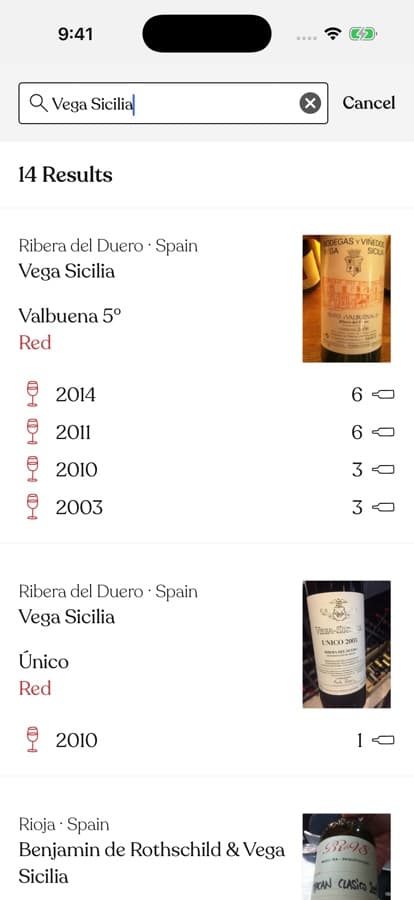 A search for Vega Sicilia: fourteen results, each with label, region and colour already filled in.
When you find your wine, adding it is a matter of choosing the vintage and how many bottles you own. All the descriptive work — where it's from, what the label actually says, which grapes are in it — is already done, because someone in the community added the wine before you. For most Spanish, French and Italian bottles of any distribution, the record already exists.
The camera path
For the bottle the search doesn't know, or when typing feels slow, the camera button opens a label scanner: photograph the front label (or pick a photo from your library) and the app matches it against the database. It's the fastest path when you're standing in front of a rack of unfamiliar bottles you've just inherited, been given, or brought home from a trip.
And when a wine genuinely isn't in the database, like the tiny cooperative bottling from a village you visited, you create it once, with your own label photo, and it joins the database for the next person.
The afternoon plan
Cataloguing a real cellar goes fastest as a production line rather than one long slog:
- Group first. Pull bottles out by producer. Six bottles of the same wine are one search and one quantity, not six entries.
- Search the knowns. Anything from a recognisable producer takes seconds. This clears most of the pile.
- Scan the strangers. Camera for the odd labels, library import for bottles you photographed at the shop.
- Create the leftovers. Whatever survives both paths gets a manual record. In a typical Spanish cellar that's a handful of bottles, not forty.
After the first pass, your home screen already earns the effort: the collection sliced by region, grape and colour, with a bottle count and total at the top.
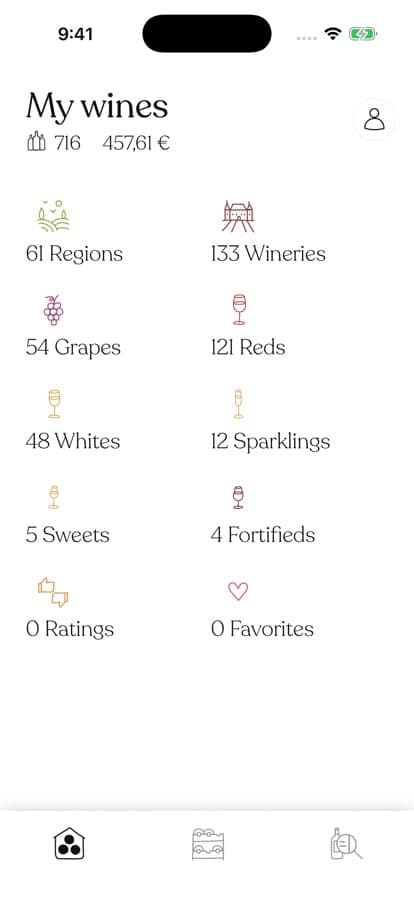 The reward for an afternoon of adding: your cellar, browsable the way wine people actually think.
From then on it's maintenance, not a project. New bottles get added on the walk from the car; each one is a search, a vintage and a number. Keeping the inventory alive also unlocks the features that need one, like drinking windows that tell you when each vintage is ready.
Frequently Asked Questions
How long does a fifty-bottle cellar really take?
Two to three hours the first time, mostly determined by how many distinct wines you own rather than how many bottles. Repeat bottles are nearly free.
Do I need to photograph every bottle?
No. If the wine exists in the database, its label photo comes with it. Your own photos matter only for wines you create from scratch.
What about bottles I can't identify at all?
Create them with whatever the label gives you: producer and vintage are enough to make a bottle findable and trackable. You can enrich the record when you open it.
The blank form was never the real task; knowing what you own is. Download WineNest, put an afternoon into it, and the cellar stops being a mystery you live with.